Powered by Gomo

Bridge Author Pro: AI-powered course authoring

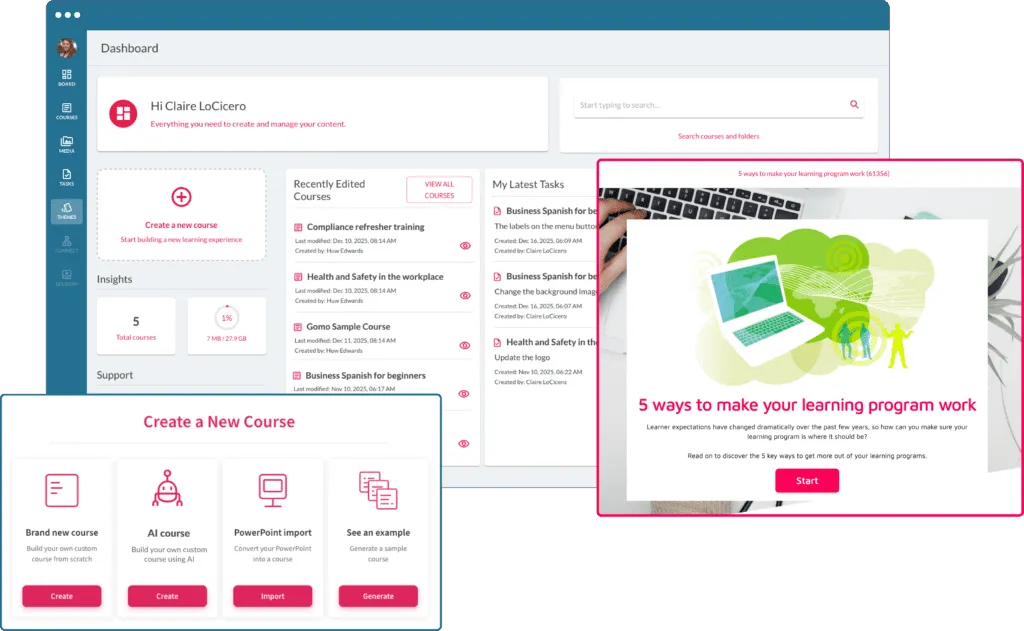
Bridge Author Pro helps you create beautiful, responsive e-learning. It includes a built-in theme library, one-click translation, time-saving collaboration tools and AI-powered course authoring. 
11M+
Learners
SOC II
Certification
4.2
G2 Rating
Trusted by people who develop people
author pro

Cut course creation time by 90%

Start from the decks you already have, let AI draft the scaffolding, translate the whole library in one click, and publish straight into Bridge LMS. Beautiful, responsive courses without the production cycle.

PowerPoint Import

Bring in PowerPoint or Google Slides with a few clicks.

Theme Library

Start from a pre-made theme or build a custom look.

One-Click Translation

Build the course once and let Bridge handle the languages.

AI Authoring

Generate introductions, objectives, and conclusions.

Author Collaboration

Several authors edit and comment in the same course.

Publish to Bridge LMS

Push instant updates to learners with a single click.

Create a course

Import PowerPoint. Build Faster.

If you have content spread across slide decks, import your PowerPoints or Google Slides with a few clicks. It’s the ultimate time-saver for busy teams who need to create high-quality training.  

Transform how your team builds courses

Speak with a Bridge Author Pro expert today and see the authoring workflow end to end.

Theme library

Customizable Themes

Choose a pre-made theme from our library to get moving fast, or build a custom look from the ground up. 

Select Languages

One-click translation

Build your course once, and Bridge will take care of the translations automatically. Every learner will get the same great experience, no matter what language they speak.

Open AI Integration

Let AI write the first draft

Built-in AI can generate course introductions, learning objectives, and conclusions, and even review your course to suggest edits for improvement.

Better Author Collaboration

Two authors, one course, no version conflicts

Collaborate seamlessly with your team. Multiple users can review and edit courses at the same time, adding comments and notes directly within the course.

Straight to Learners

Easy publishing into Bridge LMS

Delivering content to learners is simple: publish instant updates with a single click.

Bridge Author Pro -publishing courses to Bridge LMS is seamless

What's the Difference Between Bridge Author Lite & Author Pro?

Works with the tools you already use

Have questions?

Frequently Asked Questions

What is Bridge Author Pro?

Bridge Author Pro is an AI-powered course authoring tool that helps you create interactive, responsive eLearning content. Powered by Gomo, Bridge Author Pro includes AI-assisted authoring, one-click translation, customizable themes, collaboration tools, and the ability to publish courses directly to Bridge LMS with a single click.

Can Bridge Author Pro help reduce course creation time?

Yes. AI in Bridge is built to save you time. Bridge Author Pro cuts course creation time through AI-powered authoring, quick PowerPoint imports, pre-built themes, reusable templates, and streamlined publishing workflows.

What is AI-powered course authoring?

AI-powered course authoring helps you create eLearning content faster using artificial intelligence. AI authoring tools can generate learning objectives, course outlines, summaries, quizzes, translations, and content suggestions automatically In just a few minutes. Meaning you effortlessly reduce manual course creation time, improve content consistency, and scale employee training and development, fast.

What features does Bridge Author Pro include?

Everything you need to make engaging courses your learners will love. AI-powered course creation, one-click translation, drag-and-drop course building, customizable themes, collaboration tools, responsive design, quizzes, assessments, and direct publishing into Bridge LMS are all at your fingertips. The platform also supports SCORM course creating and multi-language learning experiences.

Can Bridge Author Pro translate courses automatically?

Yes, absolutely. Bridge Author Pro includes one-click AI translation capabilities that allow you to easily translate courses into multiple languages without creating separate versions of the same course.

Does Bridge Author Pro support SCORM courses?

Yes. Bridge Author Pro supports advanced SCORM course creation and allows you to publish content to Bridge LMS or export courses for use in other SCORM-compliant learning platforms in just a few clicks.

Can organizations import PowerPoint presentations into Bridge Author Pro?

Yes, it couldn’t be easier. Bridge Author Pro lets you to import PowerPoint and Google Slides presentations directly into the platform, helping you quickly convert existing training materials into interactive eLearning content.

Does Bridge Author Pro support responsive learning across devices?

Yes. Bridge Author Pro creates responsive eLearning content that automatically adapts across desktop, tablet, and mobile devices. This helps you deliver more consistent learning experiences for all employees and learners, even when they’re learning on-the-go.

See why 1,000+ companies choose Bridge

Join thousands of organizations that trust Bridge to power their learning.

Unlock AI Authoring

Build a course this week, not next quarter

Speak with a Bridge Author Pro expert and see how your existing decks become responsive, translated courses.

Speak with a Bridge LMS expert today!

Use your business email so we can route you correctly.